

-
Shop
-
Learn to make
- Help & Guides
-
About
- Tuft in Residence
- Custom rugs
-
Scissors are one of the most common reasons tufters contact us. Problems range from yarn not being cut at all, to yarn getting trapped, to scissors wearing out over time. This guide covers scissor-based cut-pile machines, including the AK-I and DUO, the KRD-I and the AK-5. It also covers knife-based cutting, such as on the AK-III.
Golden rule: after any scissors replacement, you must always re-adjust the opener AND the closer.
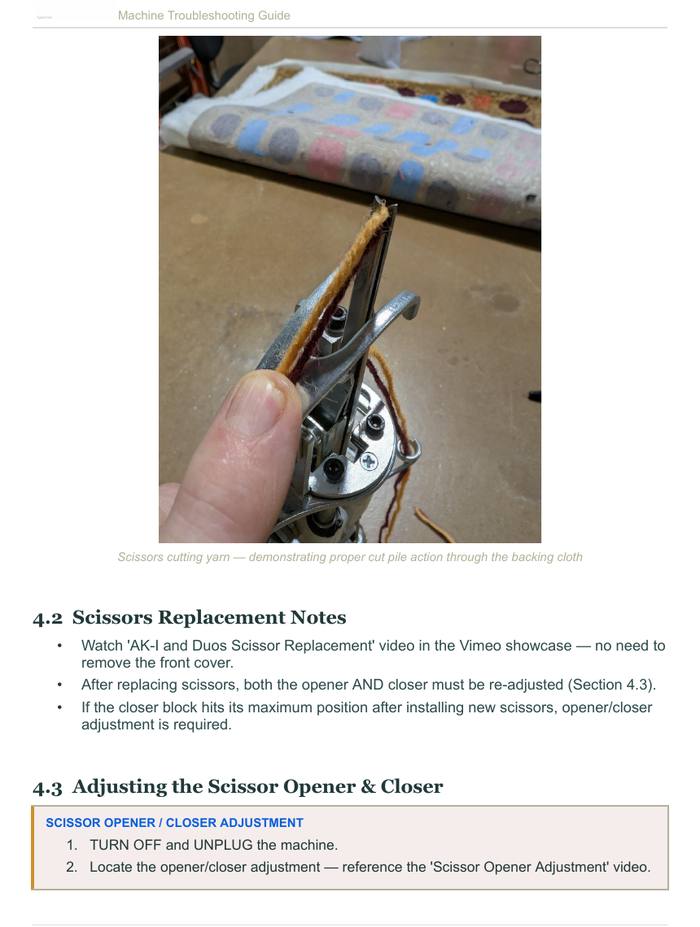
Many of the fixes in this guide start with this simple check, so it's worth learning.
Scissors that don't close all the way won't cut the yarn cleanly. You may see any of these signs:
If you see any of these, adjust the opener and closer before replacing anything.
Is your cut-pile machine leaving loops or uncut tufts, cutting unevenly, or producing choppy, fuzzy pile? It usually doesn't need a factory reset. The yarn is often the cause rather than the machine, and the scissors often just need adjusting. Work through these checks in order:
On a brand-new machine, the scissors are very unlikely to be worn out. Scissors normally last a long time. Rug wool is ideal for tufting machines, and we've used some of our machines for many years, mostly with wool, without ever replacing the scissors. If a new machine still cuts poorly with several yarns, the scissors may be faulty. Swap in the spare pair that came with your machine and contact support.
Not comfortable adjusting or replacing the scissors yourself? Contact us. We can walk you through it on a video call, or you can send the machine in and we'll make the adjustment.
The scissor action is mechanical:
If the scissors look stuck or jammed, the closer may need a micro-adjustment to push the blades together.
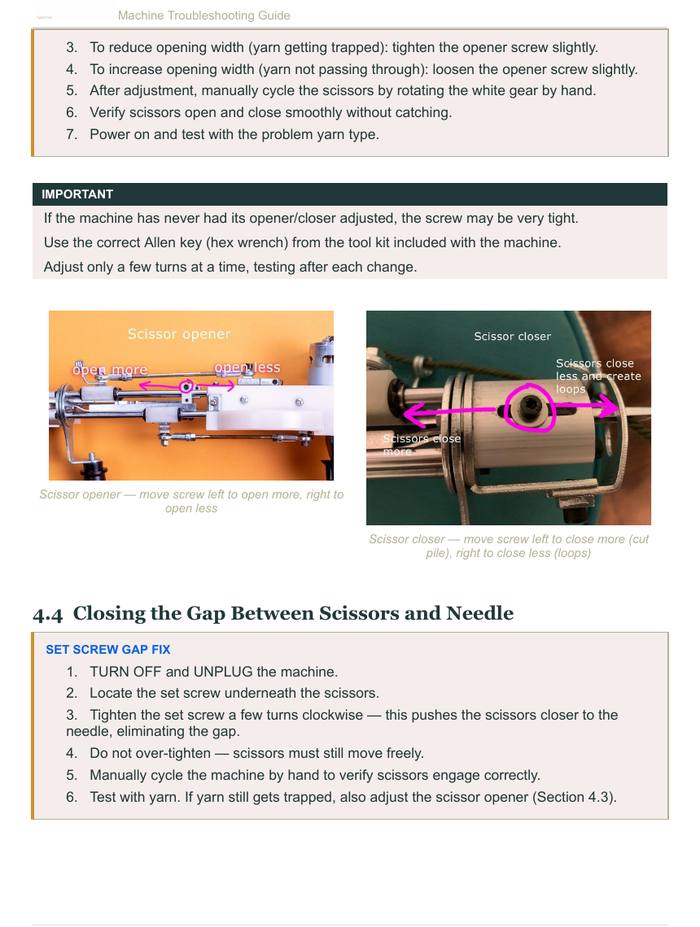
Important: If your machine has never had its opener/closer adjusted, the screw may be very tight. Use the correct Allen key (hex wrench) from the tool kit included with the machine. Adjust only a few turns at a time, and test after each change.
If your scissors seem dull or leave a tiny strand of yarn uncut, they may simply not be closing all the way.
If your scissor opener keeps breaking, or your scissors wear out or fail early, the opener or closer is usually set incorrectly.
If you've changed any settings, returning them to factory settings often fixes the problem without sending the machine in. A spare scissor opener comes in your machine's parts bag, and you can order replacements by contacting support.
AK-I and KRD-I users: contact us at support@tufttheworld.com for guidance on adjusting your scissor closer.
If your DUO has the scissor mechanism installed but still makes loops instead of cut pile, check that the scissor closer is present. Without it the scissors won't cut and the machine keeps tufting loops. Scissor closers are sold as a replacement part. To get the correct part, contact support with your order number (or the email you ordered with) and a photo of your machine.
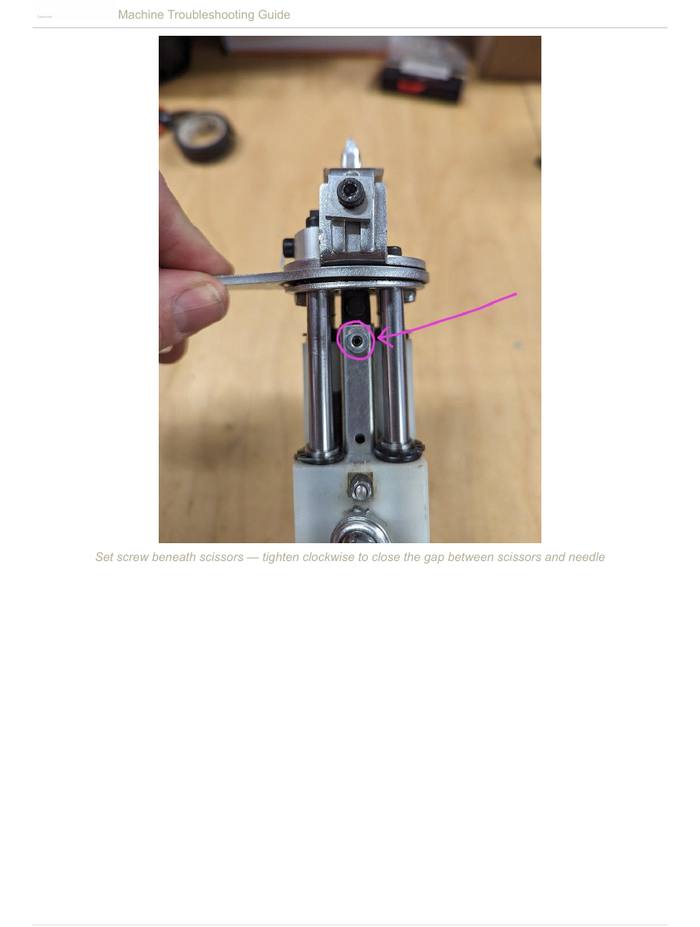
If yarn is slipping into the gap between the scissors and the needle, tighten the set screw underneath the scissors.
If yarn bunches up in the scissor area as soon as you start tufting, check the scissors before assuming the machine needs repair:
If you'd rather not replace them yourself, you can send the machine in for repair. You cover shipping both ways.
If your scissors sit open too far, they may not be able to retract back into the needle, and the machine won't cycle properly.
If the problem keeps coming back, the scissor closer may need adjusting (see Adjusting the Scissor Opener & Closer above).
Your machine may stop mid-stroke with the scissors still in the cloth while the motor keeps running. Or the scissors may leave uncut loops (accidental loop pile). The most common cause of both is a lack of oil.
Every yarn behaves a little differently when tufted. If problems continue after oiling and adjusting, contact support.
Your DUO may stop cutting yarn (the yarn stays in the fabric uncut), or the scissors may ride out of their channel, especially after a pile height change. Work through these steps with the machine off and unplugged:
Tip: Take measurements, photos and videos before you adjust, so you can return to your original settings later. Every machine is slightly different, and 1–2 mm can be the difference between cutting and not cutting. The pile height video and the scissor adjustment video in our Vimeo showcase both show this process. Still stuck? Contact support, and we can set up a video call.
Check your spare parts bag first. Machines ship with a small ziploc bag of spare parts, including an extra set of scissors and a replacement scissor opener piece. If a part breaks or wears out, look there before ordering.
Before replacing scissors that aren't cutting, do the 360° hand test. If the scissors don't fully open and close, another part has likely shifted. A quick opener/closer adjustment may fix it, with no new scissors needed.
You can sharpen dull scissors yourself, or take them to a shop that sharpens knives and scissors.
Order spares if your scissors open and close fully but still won't cut, or if you've lost your spare parts. We sell spare scissors (a few dollars each) and opener pieces. Contact support@tufttheworld.com and we'll email you an invoice to set up your order.
Replacement how-to videos are included in the video set sent with your machine, and we're happy to help with installation.
If the scissor opener breaks or wears out, we sell replacements. Contact support@tufttheworld.com with a photo of the part and your machine model.
Don't forget the screw: the opener is held on by a small, special screw. If yours is lost or damaged, tell us when you order so we can include one. It's a McMaster-Carr part (likely 92000A113), sold in packs of 25.
If the scissors still aren't opening after you install the opener:
Caution: don't move the opener too far forward. If it sits too far forward, the machine will strike it too hard and break it. Make small adjustments and re-check by hand each time.
If your machine is in cut mode but isn't cutting the yarn, start with the knife (blade):
Sharpening: the blade needs regular sharpening. Depending on how much you tuft, plan on roughly once a month. Take the knife to any professional knife or scissor sharpening service, or sharpen it yourself with standard sharpening techniques.
Replacement: your machine's tool set should include a spare knife. You can also order replacement knives from us at support@tufttheworld.com.
If your AK-III isn't cutting cleanly, check where the knife sits while it's mounted on the machine:
If the problem continues, email support a photo of the knife on the machine with the needle at its lowest position.
If your cloth is being torn or shredded while you tuft, new scissors may not fix it. Cloth damage is often caused by something else on the machine, not the scissors themselves.
If the cloth still rips after these checks, contact support with a photo. The machine may need to be sent in for repair.
If the scissors cover the needle eye and you can't thread the machine, the machine isn't returning to its home position. This is usually because the grounding bar has shifted slightly. It's an easy fix: follow our grounding bar adjustment video to reposition the bar so the machine returns home and the needle eye is clear.
If none of these steps solve the problem, contact us at support@tufttheworld.com. We're happy to help, including over a video call.
See our 32 stock yarn colors, order a swatch card, and learn how custom-dyed yarn works: minimums, pricing, color matching, timing and mothproofing.
One of the most exciting things about tufting is that texture is a design element — not just a material property. Here's how to use it intentionally.
How to transfer a design to tufting cloth: draw freehand, trace, project or pounce, plus tips on mirroring, sizing detail and planning colors.